An all-in-one cold storage management platform

Full control over every cold room, every pallet, and every degree — from a single screen

From the moment a shipment arrives until it reaches your customer: real-time temperature tracking for every chamber, automatic barcode and QR labelling for every pallet, FEFO dispatch that stops spoilage before it happens, and a dedicated tablet app for your drivers — in one cold storage WMS.
Real-time temperature tracking Automatic barcode / QR Live inventory map Driver tablet app
app.cold-storage-wms.com/dashboard
Cold storage WMS dashboard showing chamber occupancy and live temperatures
❄️ Target temperature per chamber 📦 Unique barcode per pallet ⏱️ Automatic FEFO dispatch 🗺️ Interactive storage map 📱 Dedicated driver app 🧾 Automated customer billing 📊 Ready PDF / Excel reports
Dashboard

One dashboard for every cold room you operate

Instead of walking the chambers or calling each warehouse supervisor to find out where things stand, CoolStock pulls the state of every facility — temperature, occupancy, alerts and latest movements — into a single screen that updates in real time.

Operational dashboard

Every decision you need to make, visible the second you log in

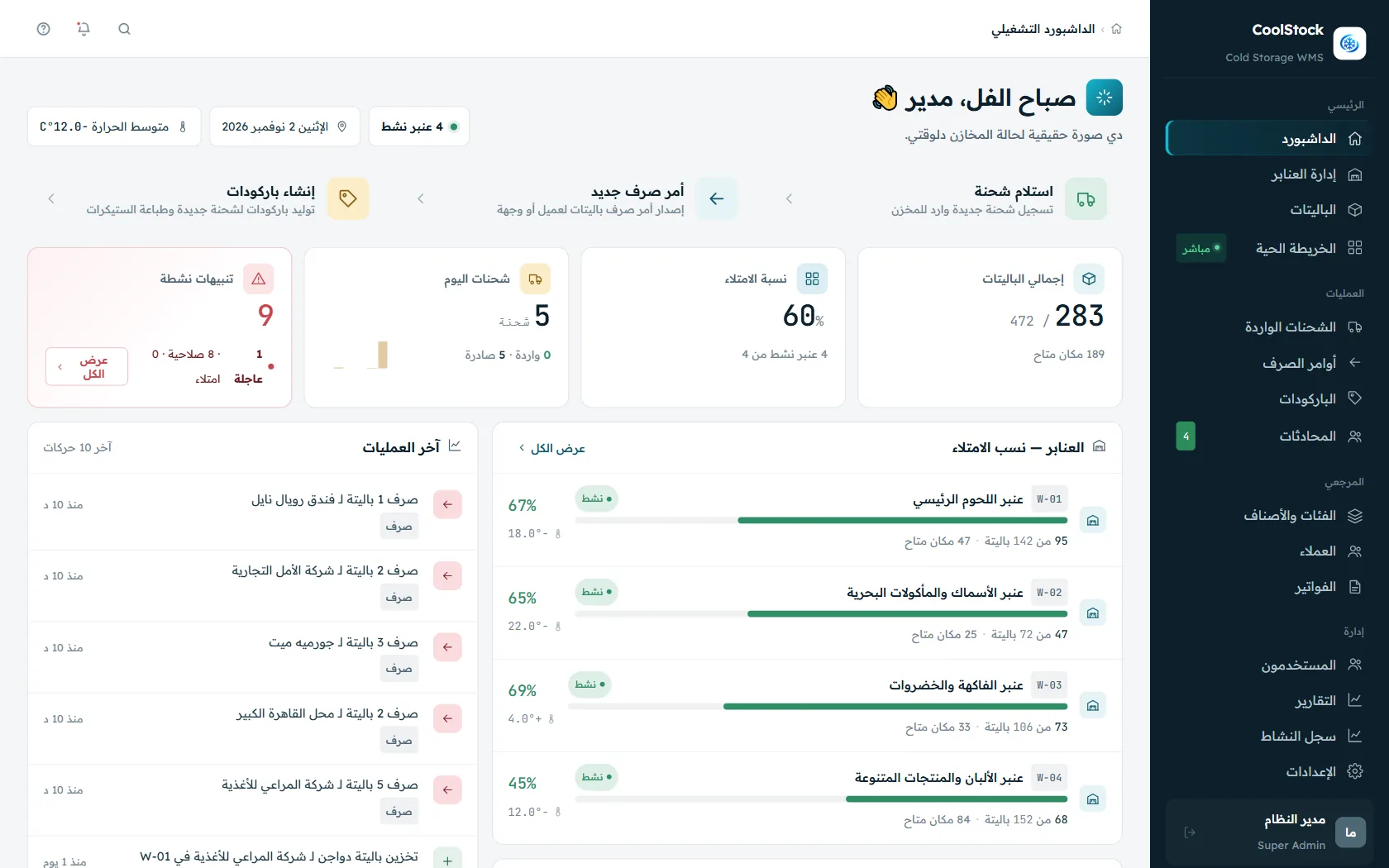
No hunting across screens to find what needs your attention. The dashboard summarises the state of all your warehouses, the alerts that matter, and the latest movements, in a clear visual layout.

  • Instant alerts for shortages, near-expiry stock and high occupancy
  • Live occupancy per chamber with current and target temperature
  • Full log of recent operations: put-away, dispatch, transfer — with user and timestamp
  • Warnings for items expiring within the next 7 days
/dashboard
Operational dashboard of the cold storage management system
Warehouses & chambers

Run multi-site refrigerated warehouses from one place

Whether you run a single cold room or a network of facilities across several regions, every chamber gets its own target temperature, its own storage map, and live tracking of every pallet inside it.

Chamber management

More than one facility? See them all at a glance

Each chamber carries its own target temperature, allowed range, capacity and live occupancy — so you know instantly which one can take the next shipment.
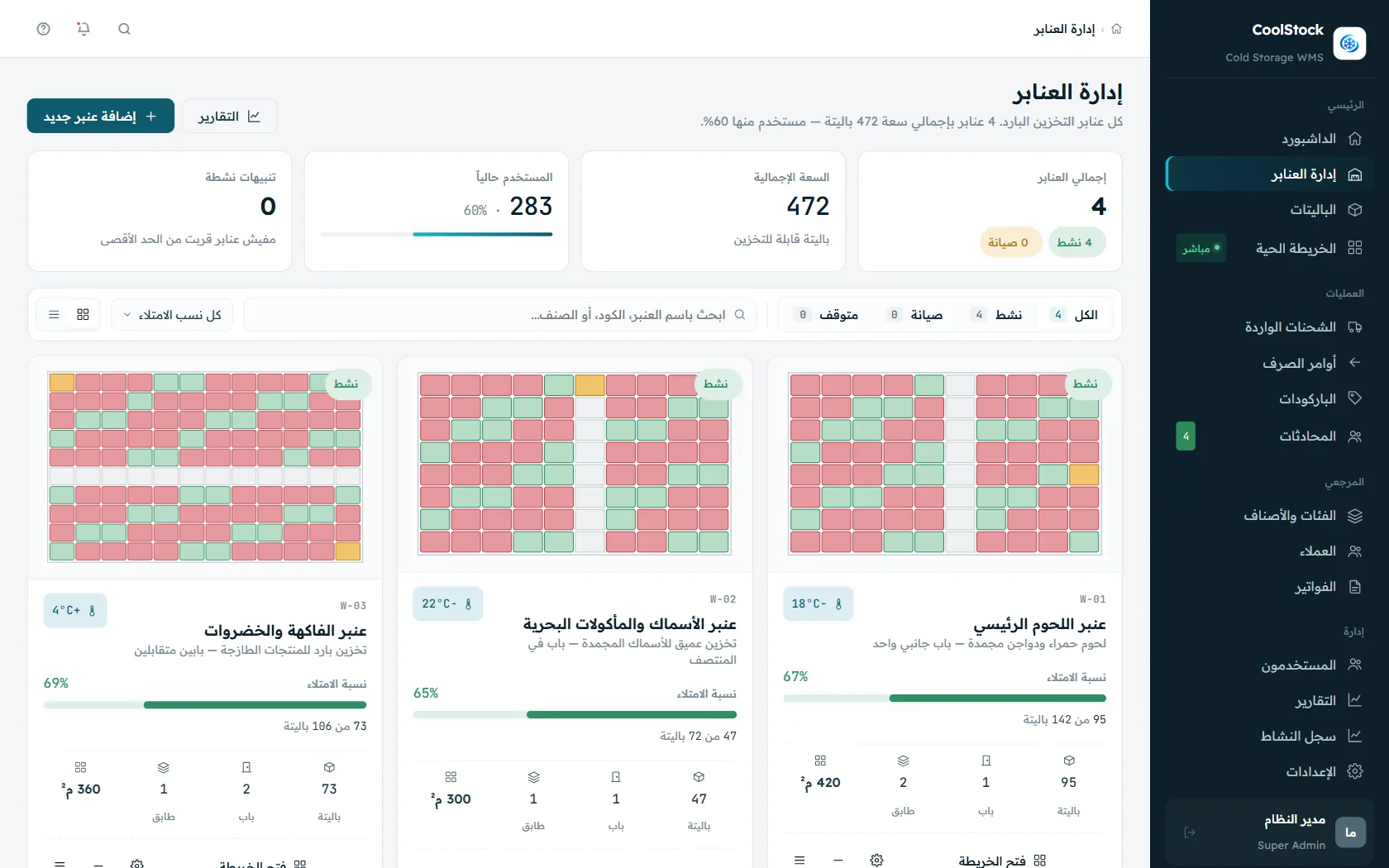
  • Unlimited warehouses and chambers under one account
  • Target temperature and allowed range defined per chamber
  • Live occupancy percentage and free capacity
/warehouses
Chamber management screen with target temperature per cold room
Live inventory map

Know exactly where every pallet is, minute by minute

An interactive map of the chamber floor shows each pallet in its real position, with its contents, expiry date and owner one click away.
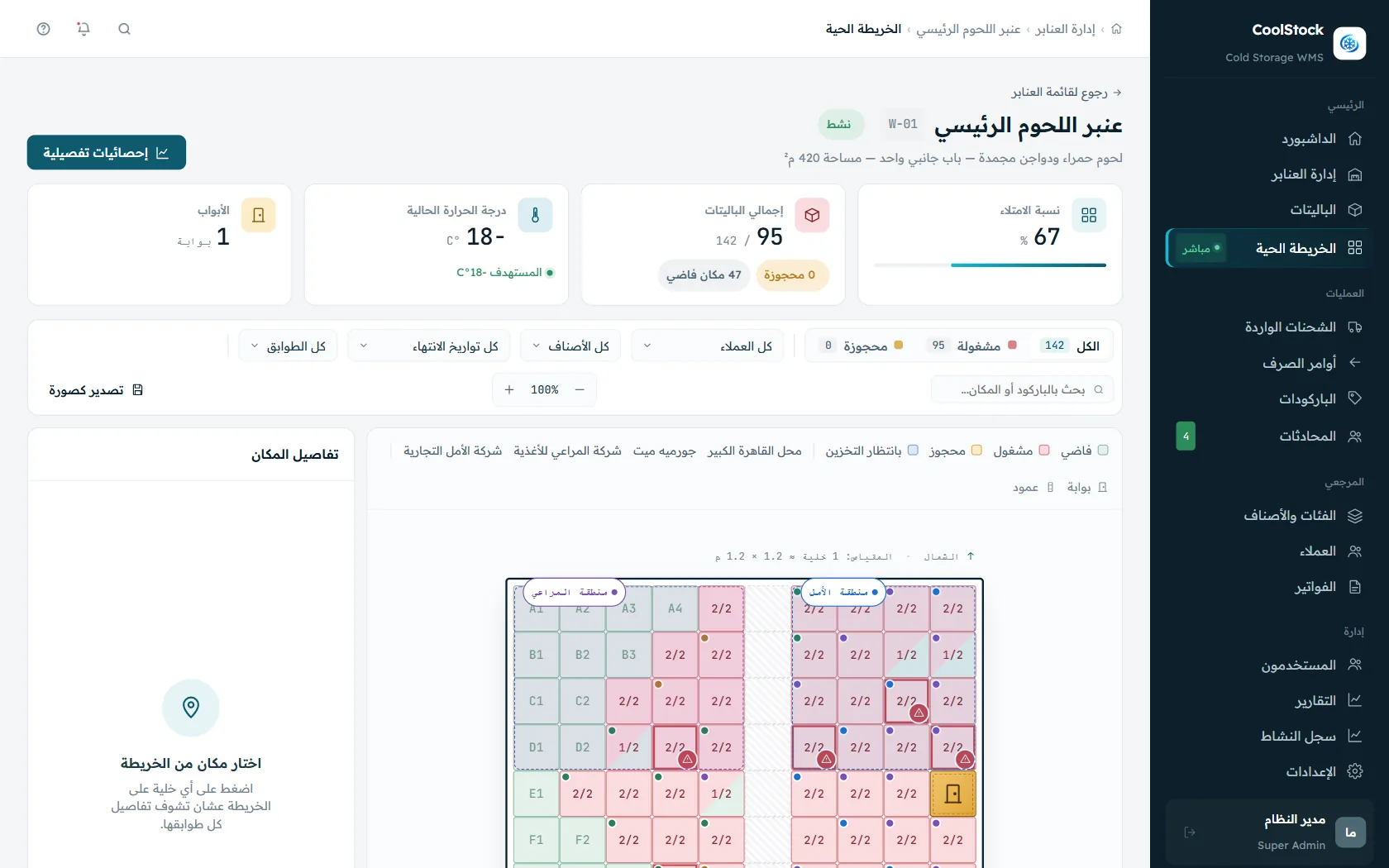
  • Visual floor plan with every occupied and free slot
  • Pallet details on click: item, quantity, expiry, customer
  • Updates instantly for every user, with no page refresh
/live-map
Live inventory map showing pallet locations inside the cold room
Layout builder

Draw your own warehouse layout — without a line of code

Recreate your real floor plan inside the system: chambers, aisles, racks and slots, laid out by drag and drop so the digital map matches what your team actually sees.
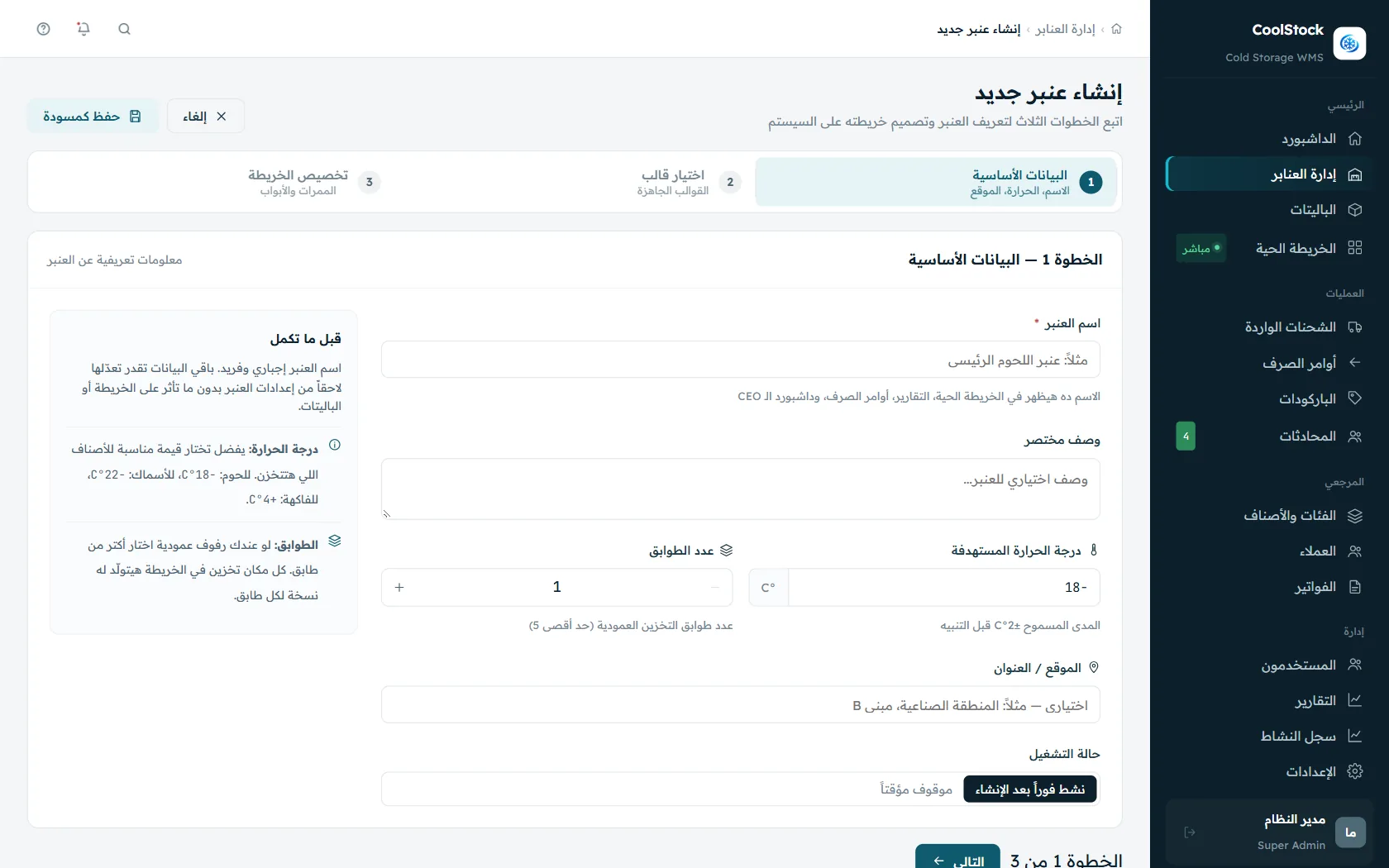
  • Drag-and-drop editor for racks, aisles and slots
  • Adjust the layout any time your warehouse changes
  • The same map drives the driver tablet app
/layout-builder
Warehouse layout builder for designing cold room floor plans without code
Daily operations cycle

From goods receipt to final delivery — controlled steps, zero paperwork

Every warehouse operation — receiving, put-away, dispatch, transfer — is captured automatically by barcode, and the map and dashboard update instantly with no manual entry.

01
Receive shipment

Log the supplier, invoice and every item with its full details

02
Automatic barcode

Generate a unique barcode/QR per pallet and print labels on the spot

03
Suggested put-away

The system proposes the best slot based on product type and temperature

04
FEFO dispatch

Automatic priority for stock closest to its expiry date

05
Deliver & invoice

Balances update and the customer invoice is issued automatically
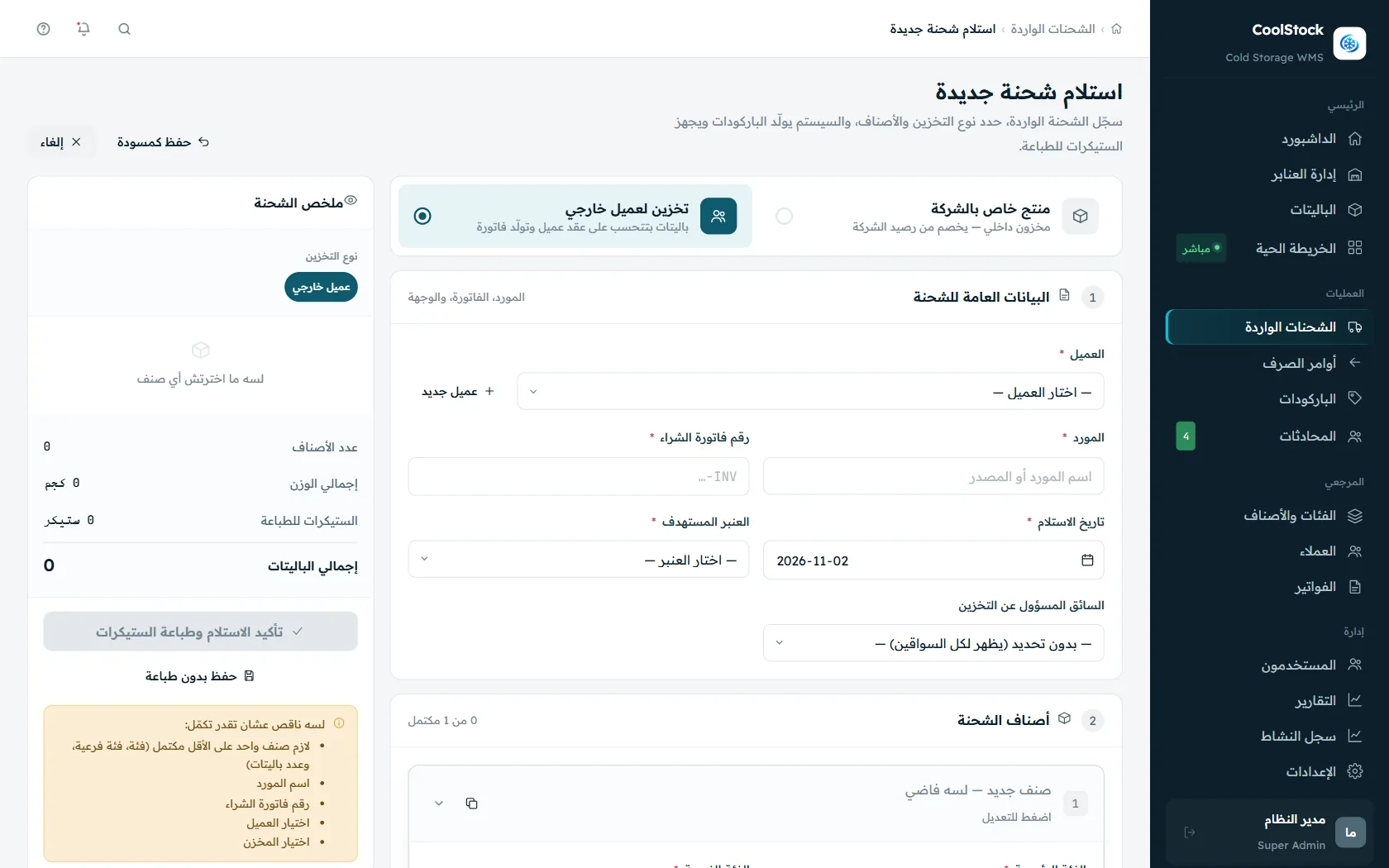
/receive-shipment
Goods receipt screen capturing expiry data in the cold storage system

Receive a shipment in minutes

Record the shipment, supplier and purchase invoice, then set category, weight and expiry date per item — the system prepares the labels and proposes storage slots that match the required temperature.
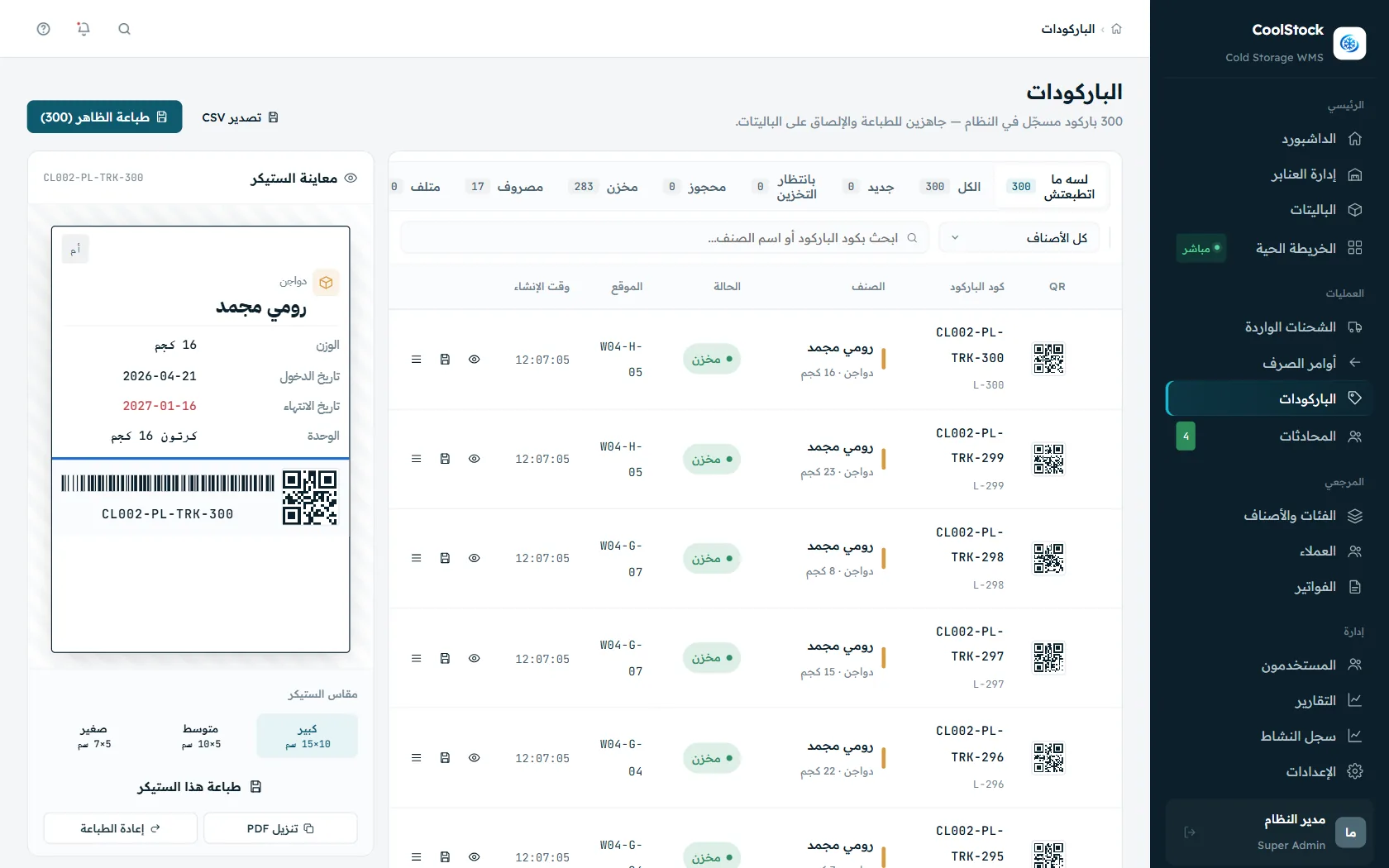
/barcodes
Unique barcode and QR label printing for every pallet in cold storage

A unique barcode and QR for every pallet

Generate and print labels in several sizes with a print preview, full support for thermal printers (TSC, Zebra), and CSV export to any other system.

Smart FEFO dispatch

Dispatch logic that prevents spoilage before it happens

Rather than leaving someone to pick a pallet by hand, the system orders pallets automatically by First Expired, First Out (FEFO) and shows the driver the shortest route through the warehouse.
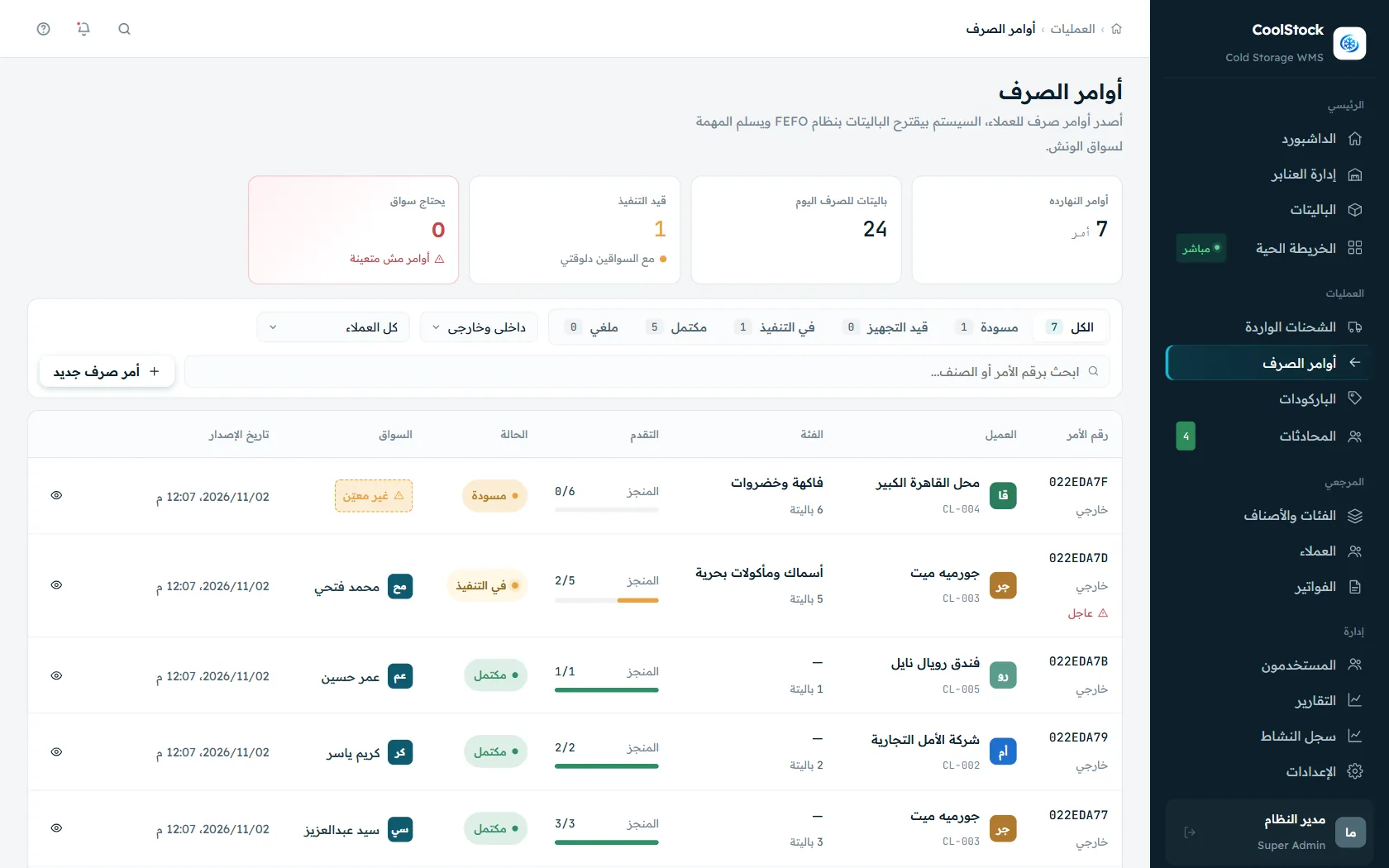
  • Automatic suggestion or manual override — the call is always yours
  • See every pallet's position on the map before executing
  • Estimated distance and time to complete the order
  • Clear warning on any pallet approaching its expiry date
/dispatch-orders
FEFO dispatch order preventing stock spoilage in refrigerated warehouses
Driver app

A purpose-built tablet app for delivery and handling crews

A simple, fast screen designed for use inside the chamber or on the road: daily tasks, the warehouse map, barcode scanning, and transfers between chambers — one tap each, no complexity.
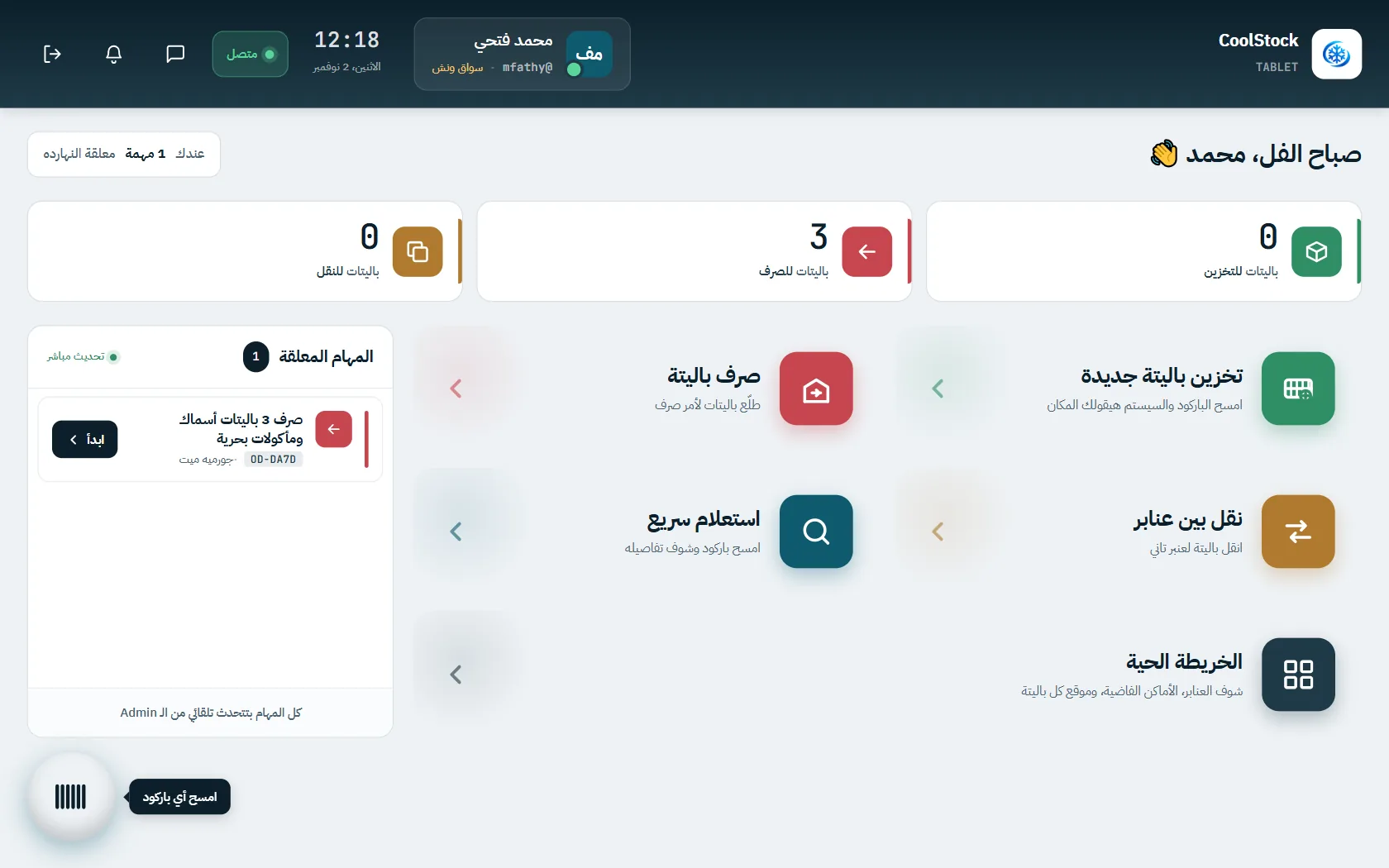
Home screen of the driver tablet app for cold storage crews
01
Today's tasks

Every task assigned to the driver, ordered and updated live by the office
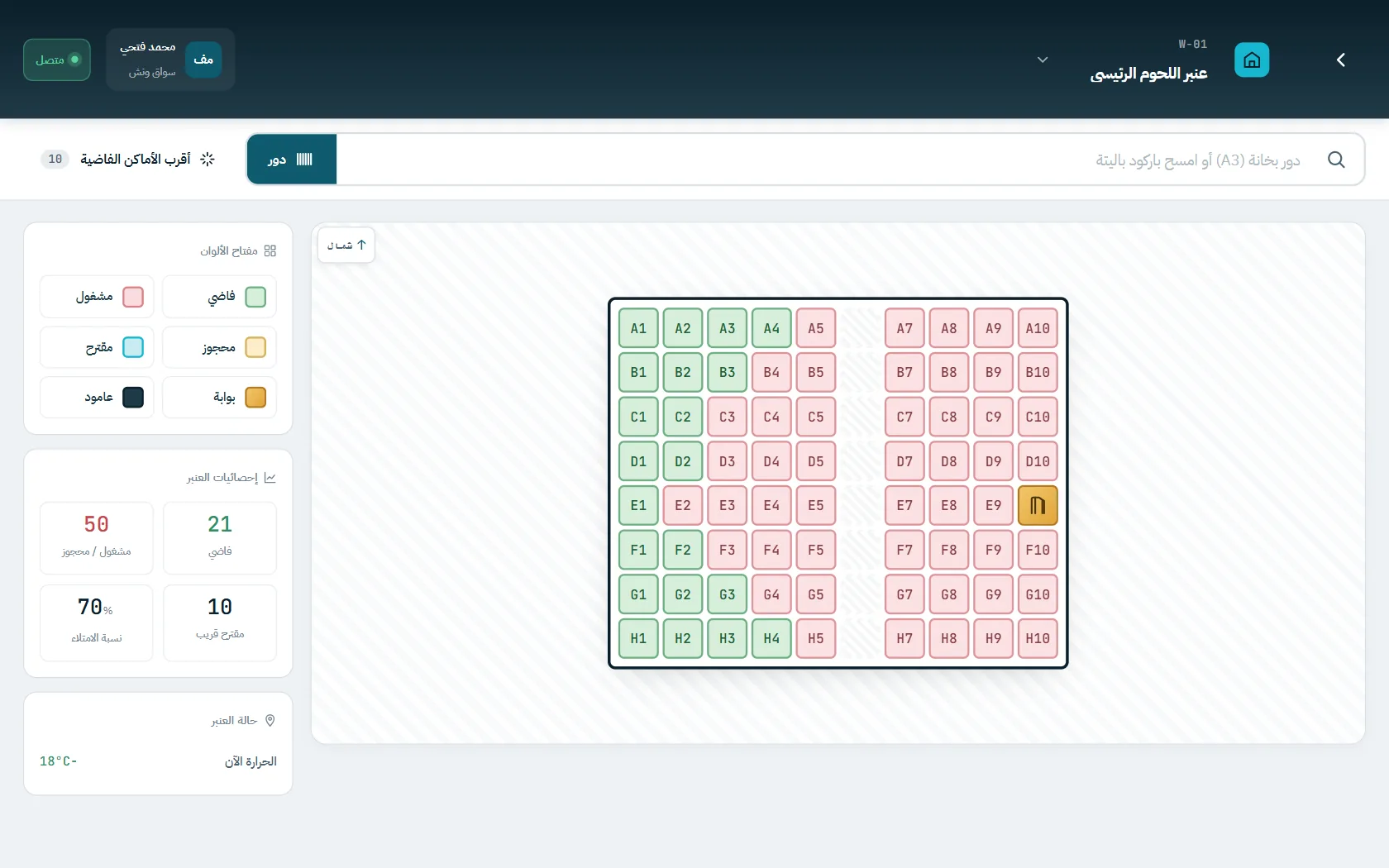
Warehouse map inside the driver tablet app for locating storage slots
02
Warehouse map

See the nearest free slots and any pallet's details while standing in front of it
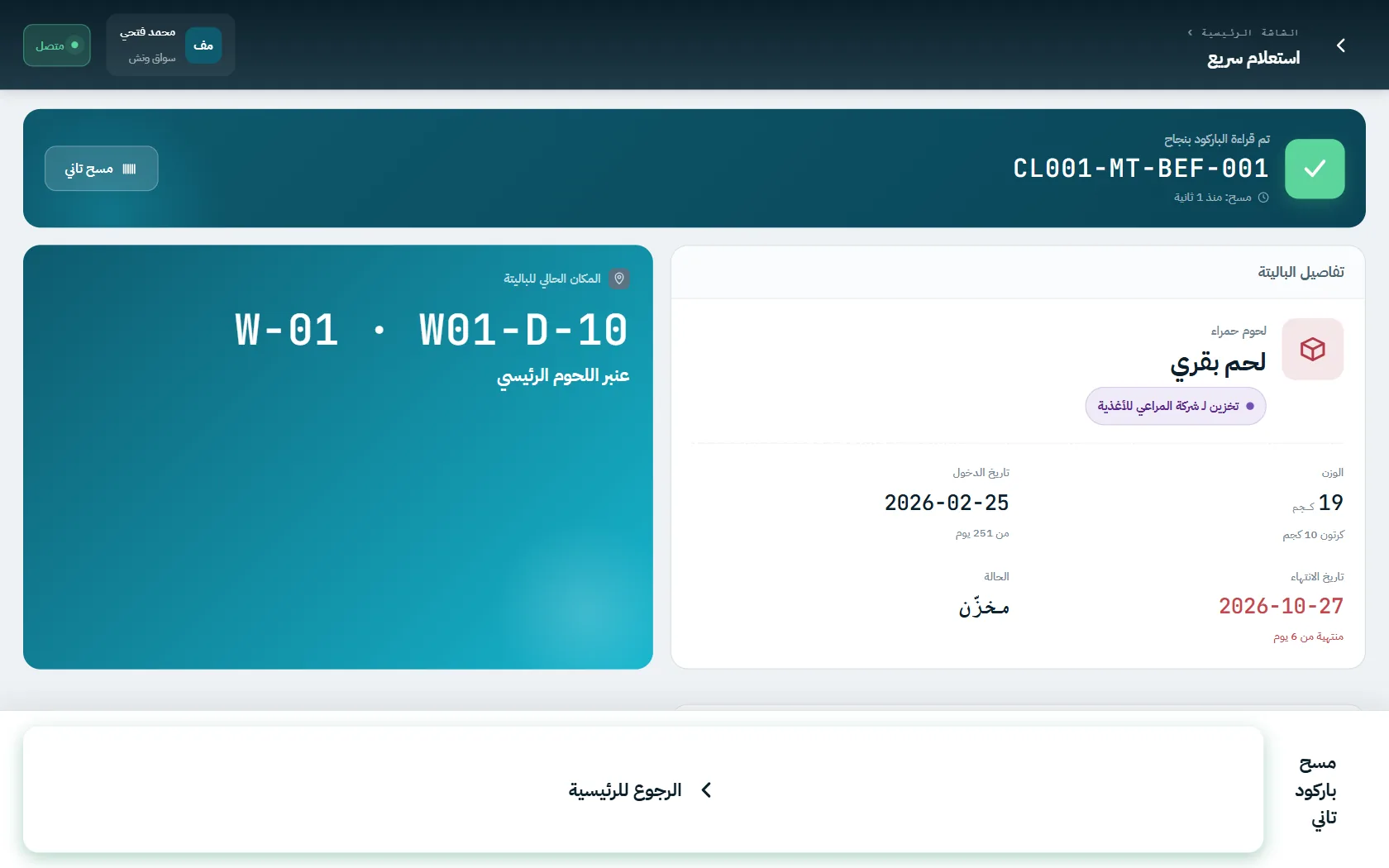
Scanning pallet barcodes with the tablet app inside the cold room
03
Barcode scanning

Scan a pallet and the system proposes the right storage slot automatically
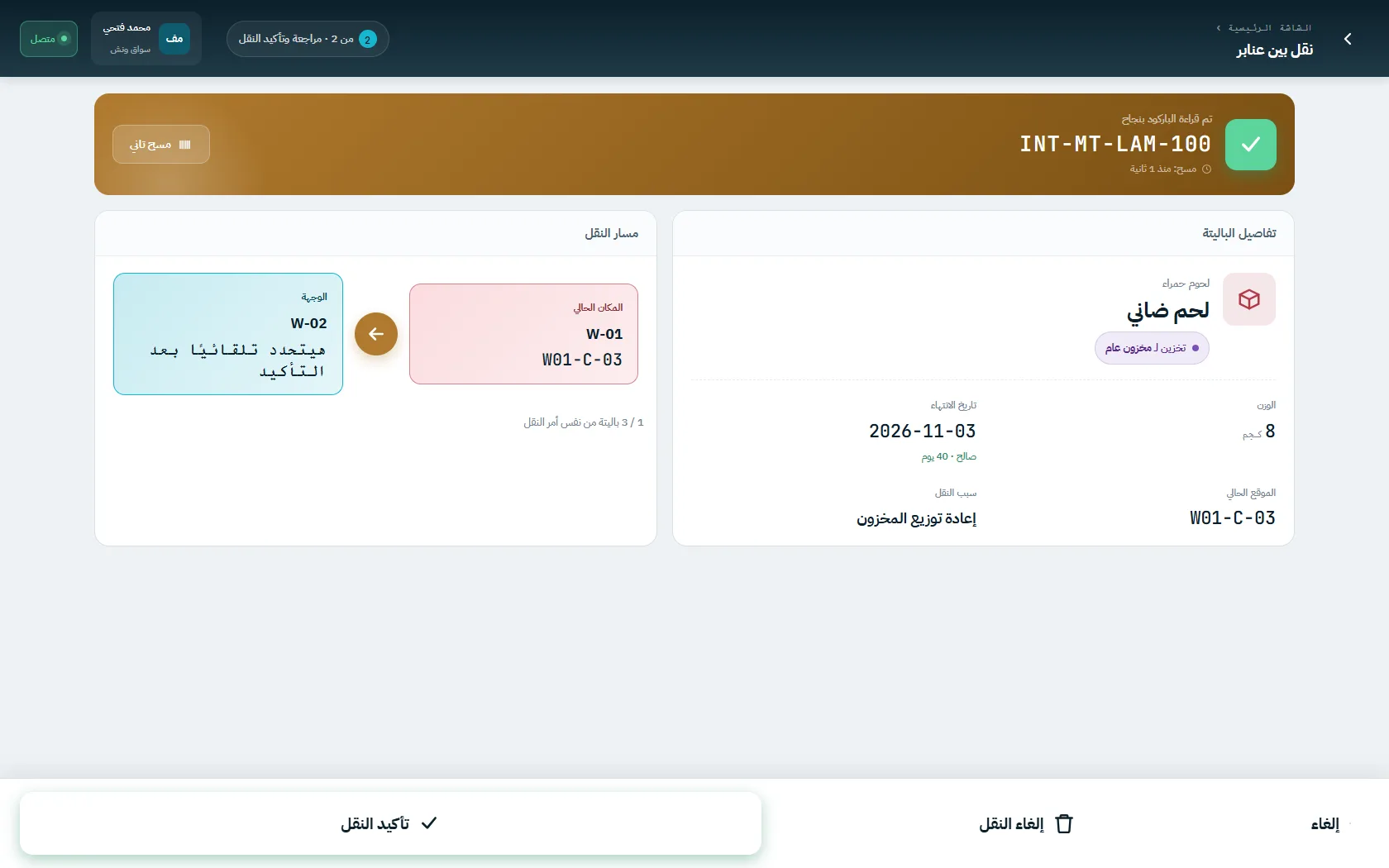
Transferring pallets between cold chambers from the driver tablet app
04
Chamber transfers

Confirm departure and arrival in two steps, with the reason for the move recorded

Business management

Not just storage — full commercial management for cold storage customers

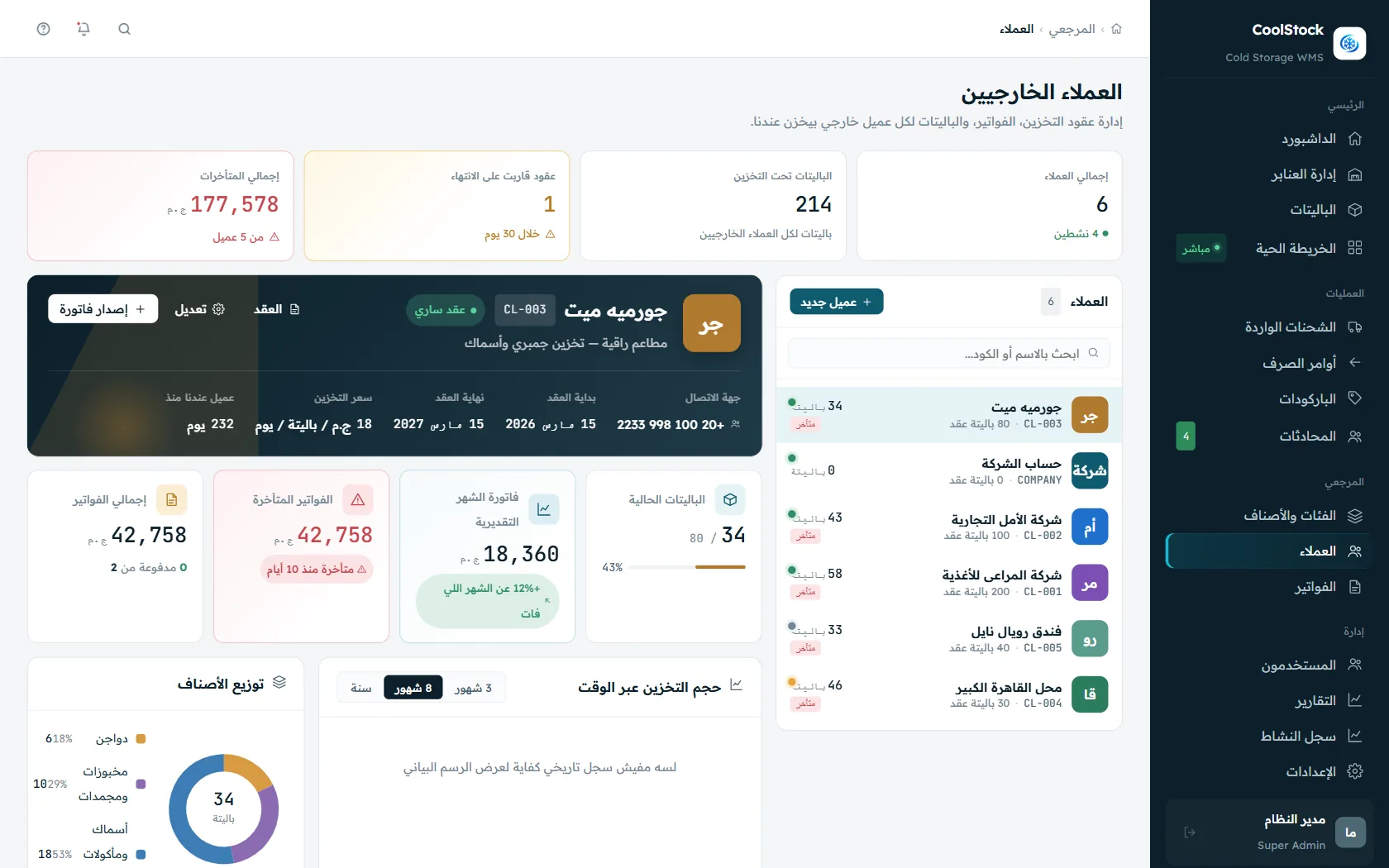
If you rent out storage space to third parties, the system handles contracts, invoicing and collection automatically, and gives you the reports behind every decision.
Customers & contracts

A complete file per customer — contract, balance, and every pallet they own

  • Storage contracts with per-customer rates and terms, and automatic renewal
  • Live tracking of contracted versus used capacity
  • Automatic alerts for contracts nearing expiry
/customers
Cold storage customer and contract management with pallet balances
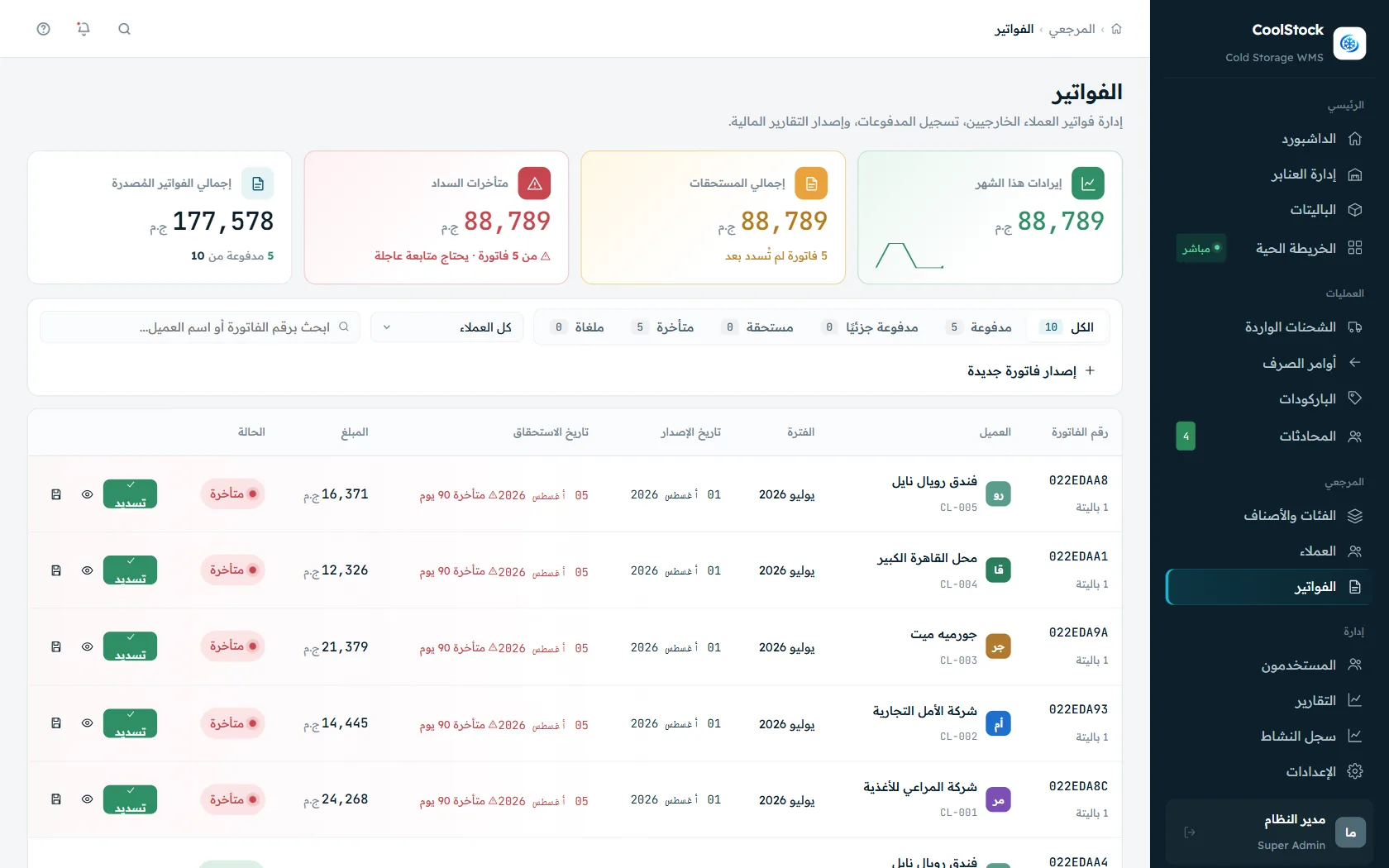
Invoicing

Automated invoicing, and collection that never slips through

  • Invoices calculated automatically from actual days in storage
  • Instant alerts on overdue invoices with a full reminder history
  • Professional PDF invoices ready to print or send directly
/invoices
Automated invoicing and collection tracking for cold storage services
Reports & analytics

Reports that support a decision — not just numbers on a screen

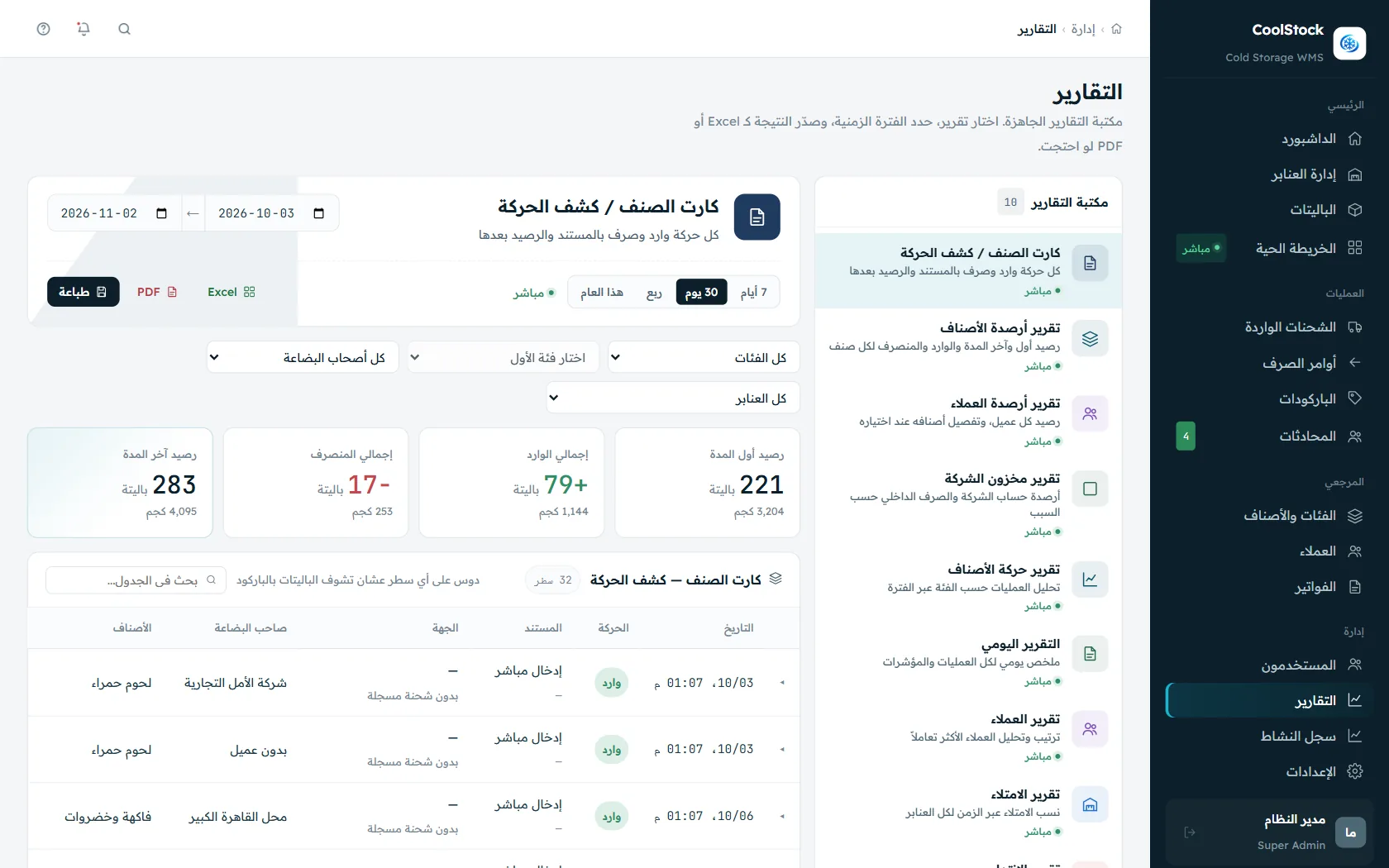
  • Reports on stock movement, occupancy, expiry and crew performance
  • Quick filtering by period (day / week / quarter / year)
  • One-click export of any report to PDF or Excel
/reports
Operational and financial reports exportable to PDF and Excel
Who uses it

Built for every business that depends on refrigerated storage

What you store changes how you store, dispatch and control it. The system adapts to your operation rather than the other way round — from fruit and vegetable cold rooms to temperature-controlled pharmaceutical warehouses.

🥪

Fruit & vegetable cold rooms

Seasonal goods with short shelf life make dispatch order a profit-or-loss decision. FEFO releases the nearest-to-expiry stock first, automatically, and alerts reach you days before expiry rather than after it.

🥩

Meat, poultry & seafood stores

Deep freezing demands temperature control that never sleeps. The system logs each chamber's temperature in real time, alerts the moment it leaves the allowed range, and keeps a full history that stands up as compliance evidence.

💊

Pharmaceutical warehouses

Precise batch and expiry tracking for every pallet, plus a complete movement log with user and timestamp — the foundation that makes pharmaceutical storage procedures auditable.

🏭

Food factories & frozen producers

Connect production to storage: receive the daily output with automatic barcoding and put it away in the right chamber, with the system already aware of free capacity and temperature.

📦

Third-party cold storage providers

If you rent out refrigerated space, each customer gets a file with their contract and rates, their pallet balance, and automatic invoicing based on storage duration and pallet count.

🚛

Logistics & cold chain operators

From receipt to delivery: ordered dispatch runs, a tablet app that guides drivers to the pallet inside the warehouse, and barcode-verified proof of delivery.

Why this system

Not a generic WMS — engineered specifically for the cold chain

There is a real difference between an ordinary warehouse management system and one built from the ground up to understand refrigerated storage.

Genuinely built for the cold chain

Per-chamber temperature tracking, expiry alerts and FEFO are not add-ons here — they are the basis of the design.

Full Arabic and English interfaces

A complete RTL Arabic interface built natively — not a translation layer — alongside an English one for mixed teams.

Works on any device

Desktop for management, tablet for drivers and handling crews, and mobile for a quick check from anywhere.

Flexible user permissions

Manager, warehouse supervisor, accountant, driver — each sees and does only what their role requires.

Live updates without refreshing

Any put-away, dispatch or transfer appears instantly on the map and dashboard for every user.

Implementation and training included

We do not just hand over software — we configure it against your real warehouses and train your team on it.

FAQ

Common questions about cold storage management software

If your question is not answered here, send it over and we will answer from real implementation experience.

What exactly is a cold storage management system?
A cold storage WMS digitises every operation in a refrigerated warehouse: receiving shipments, assigning a storage slot to each pallet, tracking temperature, ordering dispatch by expiry, and invoicing. What separates it from an ordinary warehouse system is that it treats temperature and shelf life as first-class data, not optional fields — which is what prevents spoilage and keeps every movement documented.
What is FEFO and why does it matter in cold storage?
FEFO stands for First Expired, First Out — the stock closest to expiry leaves first, rather than the oldest received as under FIFO. For refrigerated goods this is decisive: a shipment received late may well expire first. The system orders dispatch automatically by expiry date and blocks the wrong pick, which cuts measurable spoilage within the first months of operation.
How does the system track cold room temperature?
Every chamber is assigned a target temperature and an allowed range. The dashboard shows the current reading per chamber in real time and raises an immediate alert when it drifts out of range. Every reading is written to a historical log you can pull up for a review, an audit, or a dispute with a customer over the condition of their goods.
Does it handle more than one warehouse or site?
Yes. You can run an unlimited number of warehouses and chambers from the same account, each with its own map, temperatures and permissions. Management sees every site on one screen, while each warehouse supervisor sees only their own. Transfers between chambers or between sites are recorded as full movements with user and timestamp.
Do I need special hardware to run it?
No. The system runs in the browser on any computer, and the driver and handling tablet app works on a standard tablet. For scanning you can use the tablet camera or an ordinary barcode reader (USB or Bluetooth). If you already have temperature sensors installed, we can connect them to the system instead of entering readings manually.
Does it include billing for storage customers?
Yes, if you rent refrigerated space to third parties. Each customer has a file with their contract and agreed rates, and every pallet stored in their name. The system calculates the invoice automatically from storage duration, pallet count and any additional services, and tracks paid versus outstanding so no invoice slips past you.
What happens to the warehouse data I already have?
We start with a setup session where we recreate your real warehouse layout inside the system (chambers, aisles, racks), then import your current stock from Excel files or your previous system. Once imported, a barcode is printed for every existing pallet and linked to its position on the map, so you are operational from day one.
How long do implementation and training take?
It depends on warehouse size and the number of SKUs, but a typical single-warehouse implementation takes two to four weeks, including layout setup, stock import and team training. Training runs by role — management, warehouse supervisor, accountant and drivers — and technical support continues after go-live.
Is the system available in Arabic?
Yes. The Arabic interface was built natively with full RTL support, not translated from a foreign product. That shows in the terminology, in the direction of screens and reports, and in how easily warehouse crews use the tablet app without a language barrier. The Arabic version of this page is available too.

Ready to change how you run your cold storage?

Book a live demo and we will walk you through the system running on data that mirrors your own warehouses, and answer any question about implementation and integration with your existing systems.